Install R & RStudio
Why use/learn R?
R is useful for data analysis. It is a very powerful computational tool that is free and relatively easy to use (even for non-computer science people)
Not convinced yet? Try googling “why use R” or read this blog post
R vs. RStudio
- Think of R as the engine
- RStudio is the vehicle/interface that makes using the engine easier
- You must install both R and RStudio
Getting started
(1) Download R
You need to download the correct version of R depending on the type of your computer. When you google “download R”, you will find different links for Windows and Macs. If you have a Mac, make sure that you download the R that is compatible with your MacOS and also install XQuartz.
Installation Tip: After downloading, double-click the .pkg or .exe file and follow the standard installation steps.
(2) Download R Studio
Again, make sure that you download the correct version for your computer!
(*) Alternative: R Cloud
If you want to use R without downloading it, you can use R Cloud. You will first need to create a (free) account and it requires internet access.
R Cloud (Posit) — a free, browser-based alternative (requires sign-up)
Let’s get started
Recall that R is the engine and RStudio is the interface that lets us use that engine. You will (probably) never open R directly. Always make sure that you open up the R Studio.
Once you open up R Studio, you should see 4 window panes. On the left top quadrant, you will see your script (where you will type in your code). On the bottom left is the console/terminal (where R will show you what it’s doing). On the right top, the first tab shows the environment, or what I like to call “pantry”, where you see your objects and datasets saved. Below is the viewer, where you have tabs like “Files”, “Plots”, or “Viewer”, which shows the graphs and other outputs.
What Does RStudio Look Like?
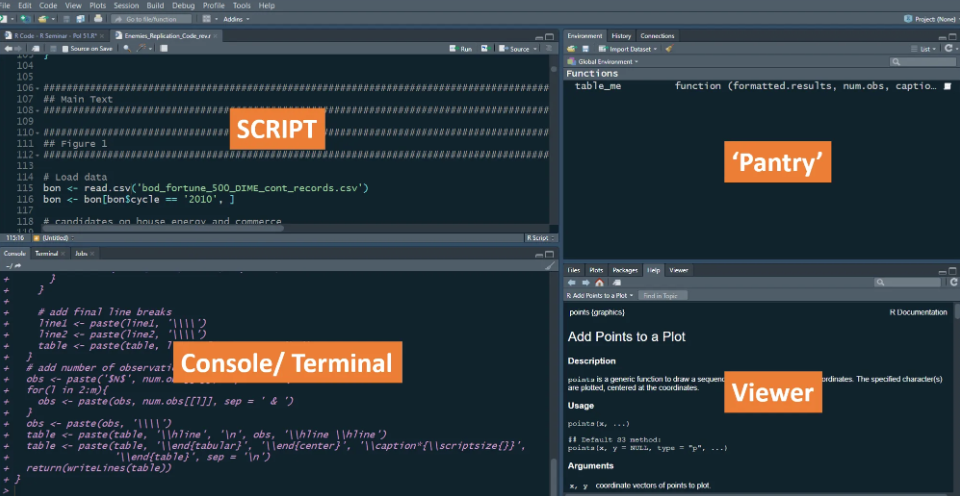
Your version may have a white background.
To change it go to the top and click:
Tools → Global Options → Appearance
Setting Up Your Working Directory
Working directory is like the address for your computer. To manually set your working directory in R: (the two lines do the same thing)
setwd(“C:/Users/myname/Downloads/methods”)
setwd(“C:\Users\myname\Downloads\methods”)
You can also do it with simple clicks.
To change it go to the top and click…
Session → Set Working Directory → Choose Directory
…and then click the folder where you want to save the code.
IF you choose to do the clicking method, make sure to copy and paste it on your R script so that you have it saved.
⚠️ NOTE: If you are using an R project, the working directory is automatically set to the folder that R project is saved in. Then you can use the relative file path, meaning that you don’t have to repeat the full working directory.
A few notes to remember
R Studio offers different types of file: R script, R Markdown (RMD), Quarto script, etc. If you click “File -> New File”, you will see lots of options.
If you are going to mainly code things, R script will be the best.
If you want to provide a lot of regular human language explanation, I’d recommend RMD or Quarto.
Although R has many built-in functions, you will find many useful
packagesthat have functions and datasets. You will have to download the packages (using a function calledinstall.packages()) and then load them up (withlibrary()function). You only need to download a package ONCE (unless you delete your R), but every time you open up R Studio, you will have to re-load them using thelibraryfunction.It’s a good practice to put all the library functions on top of the code, and run the code in order. R is very smart, but also stupid, in a sense that you have to tell it exactly what you want.
Since order matters, it’s also a good practice to code in an orderly matter. Try not to jump around so much. If a code doesn’t work, comment it out (if you put a
#, R will not recognize it as a code.Every punctuation points (such as commas (,) or quotation marks (” “) matter in R. If R gives you an error, read it, and see if you are missing any small details.
ALWAYS SAVE YOUR WORK FREQUENTLY.